

Add your own prefix to Instant coupon codes
Merchants can now add their own prefix, such as SHOP-, to each coupon code that Instant creates, improving reporting in Shopify.
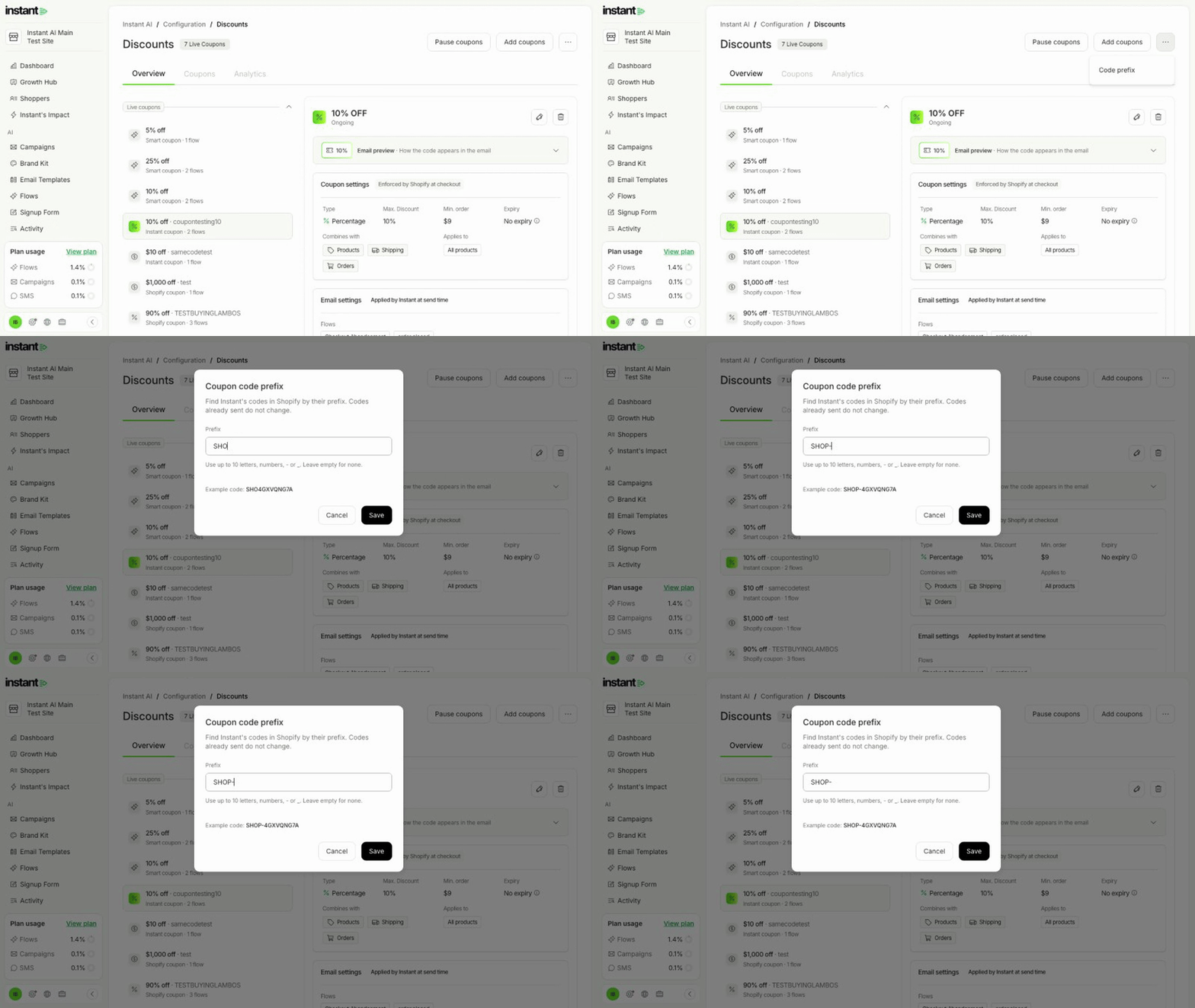
- Merchants can tell Instant's coupon codes apart from their other codes in Shopify orders, order exports, and the reporting tools that read Shopify orders.
- Tracking and reporting on Instant's discounts takes one filter: codes that start with the prefix.
- On the Discounts page (Configuration → Discounts), open the ⋯ menu to the right of "Add coupons", then choose "Code prefix".
- Type a prefix of up to 10 letters, numbers, - or _, such as SHOP-. Lowercase letters change to capitals as you type, and an example code shows the result.
- Click Save. Each new unique and Smart coupon code that Instant creates in Shopify and sends in emails and SMS then starts with your prefix, such as SHOP-4GXVQNG7A.
- The example codes in "Add coupons" and in the coupon edit window show the prefix too.
- To stop using a prefix, clear the field and click Save.