

Import a whole campaign or flow, also from another site
Merchants can now import a whole campaign or flow, with all of its emails, from the same site or from another site that they are a user of.
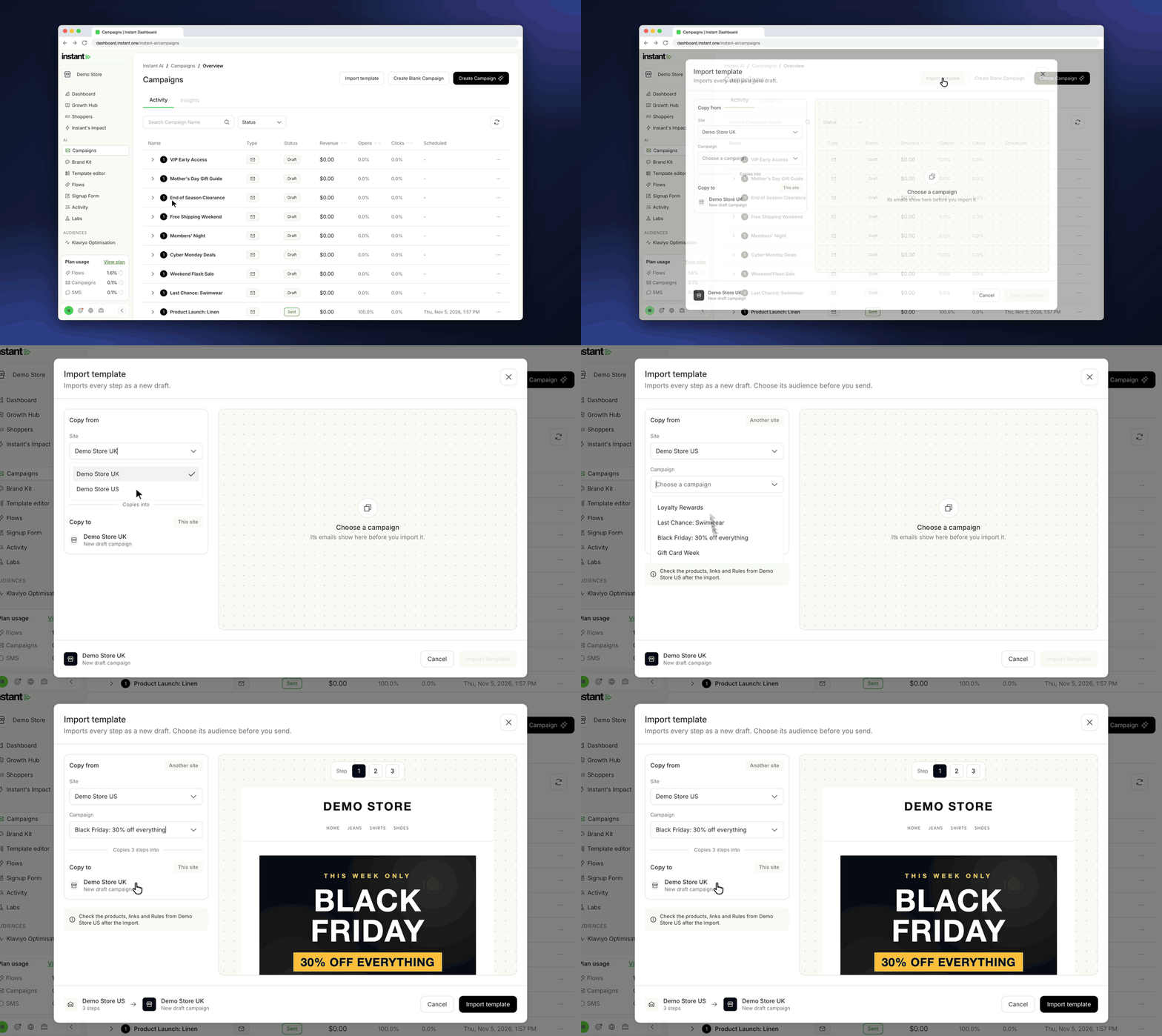
Now merchants can build templates once and import them into each store. The brand of each store comes from its own Brand Kit.
- *Import a campaign:* on the Campaigns page, click "Import template". Choose a site and a multi-step campaign, look at each step in the preview, then click "Import template". Instant makes a new draft campaign with every step, and opens it.
- *Import a flow:* on the Email Templates page, open a flow that is off and click "Import template". Choose a site and a flow. The import replaces all steps of the open flow. The flow keeps its trigger, its name and its on/off state.
- *Preview before you import:* the modal shows each step of the source as this site will send it, with this site's logo, links and products.
- *Clear status lines:* the modal says what to check before or after the import. For example: products that this site does not have, subjects that AI writes in this flow, SMS steps that the flow does not send, and emails that are not ready to send.
- *Clone one email from another site:* in the email editor, the "..." menu > "Clone template" now lets every merchant choose another site too. The subject and preview text now follow the rules of the flow that the email goes into.