Start subscription flows from Skio
Merchants who use Skio for subscriptions can now connect it to Instant and send subscription emails from Skio events.
- Welcome, renewal reminder, failed payment and cancellation emails now run in Instant, from the moment each event happens in Skio.
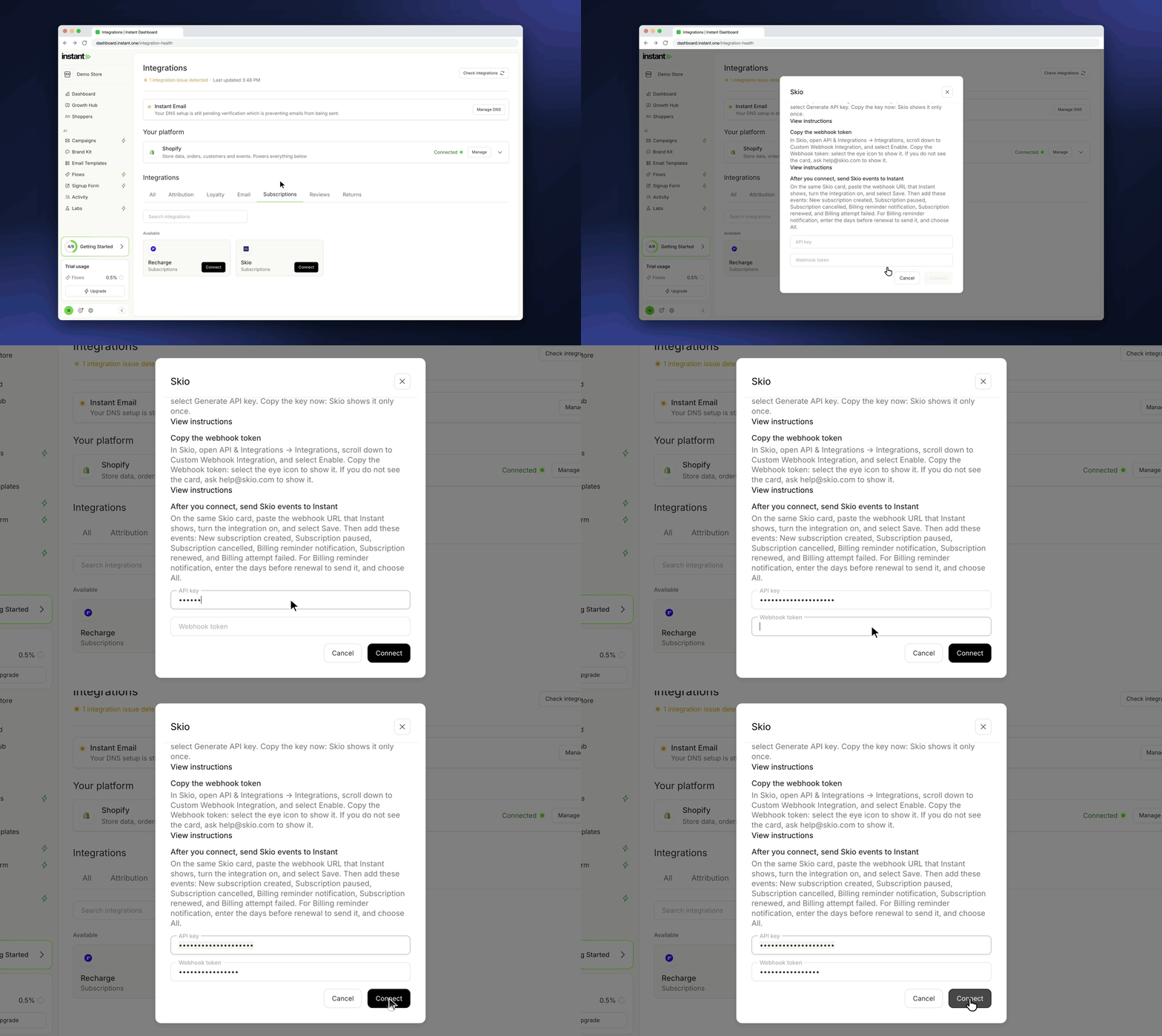
- Skio is now in the integration catalog, under Subscriptions. Open Integrations, find Skio, and click Connect.
- To connect, enter 2 values from Skio: an API key (Skio: API & Integrations → API Keys) and the Webhook token of Skio's Custom Webhook Integration card (Skio: API & Integrations → Integrations).
- After you connect, Instant opens the Skio page and shows your webhook URL with a copy button. Paste it into Skio's Custom Webhook Integration card, turn the card on, and add the events.
- Skio events start the 6 subscription flows in Flows: Subscription started, Subscription paused, Subscription cancelled, Upcoming subscription order, Subscription order succeeded, and Subscription order failed.
- Each flow comes with a default email that uses Skio's details, such as the product, the next billing date, and a button to the shopper's subscription page.